
Cancelling Audible is easy once you know where your membership is billed from.
The process is slightly different for memberships purchased through Audible/Amazon, the Apple App Store, or the Google Play Store, which is where many users get confused.
In this guide, I will show you exactly how to cancel your Audible membership in 2026, what happens to your credits and audiobooks, and what to check before you cancel.
Table of Contents
- Quick Answer: What Happens When You Cancel Audible?
- How to Cancel Audible Membership
- What Stays and What Disappears After Cancellation?
- Should You Pause Audible Instead?
- Frequently Asked Questions
Quick Answer: What Happens When You Cancel Audible?
Cancelling Audible stops future membership billing, but what happens to your audiobooks depends on the membership plan you have.
| Feature | What Happens After Cancellation |
|---|---|
| Purchased audiobooks | Remain in your library |
| Audiobooks obtained with credits | Remain in your library |
| Audible Standard audiobook selections | Access is removed |
| Audible Plus Catalog access | Removed |
| Unused credits | Usually lost after cancellation |
| Membership billing | Stops |
| Audible app access | Still works for eligible books in your library |
Audiobooks obtained through Audible Premium Plus credits remain yours permanently. However, audiobook selections made through Audible Standard and content included in the Audible Plus Catalog are no longer accessible once the membership ends.
How to Cancel Audible Membership
The exact cancellation process usually depends on how you originally subscribed to Audible.
If you subscribed directly through Audible or Amazon, you can usually manage your membership through the Audible app or website. However, if you signed up through the Apple App Store or Google Play Store, cancellation must be completed through those platforms instead.
If you are not sure where your membership is billed, start by checking the Audible app. You can then follow the appropriate method below based on the subscription details shown in your account.
Cancel Audible Through Audible App
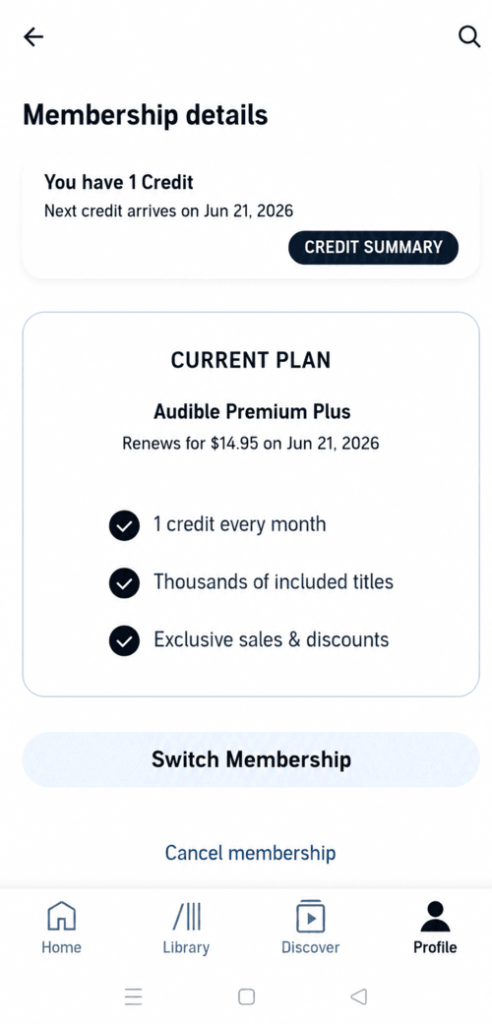
- Open the Audible app.
- Tap Profile in the bottom menu.
- Select Membership Details.
- If membership management is available through the app, tap ‘Manage‘ membership.
- Select Cancel Membership from bottom of the screen
- Follow the on-screen instructions to confirm the cancellation.
Depending on your account type, Audible may redirect you to the Audible website to complete the final cancellation steps.
During cancellation, Audible may show:
- discounted membership offers,
- free credits,
- or a temporary membership pause option.
Many users ignore these screens too quickly, but sometimes the offers are genuinely useful if you only want a short break from Audible.
Cancel Audible Through Audible Website
If your membership is billed directly through Audible or Amazon:
- Sign in to the Audible website.
- On desktop, hover over your username in the top-right corner.
- On mobile, open the main menu (≡) and tap your username.
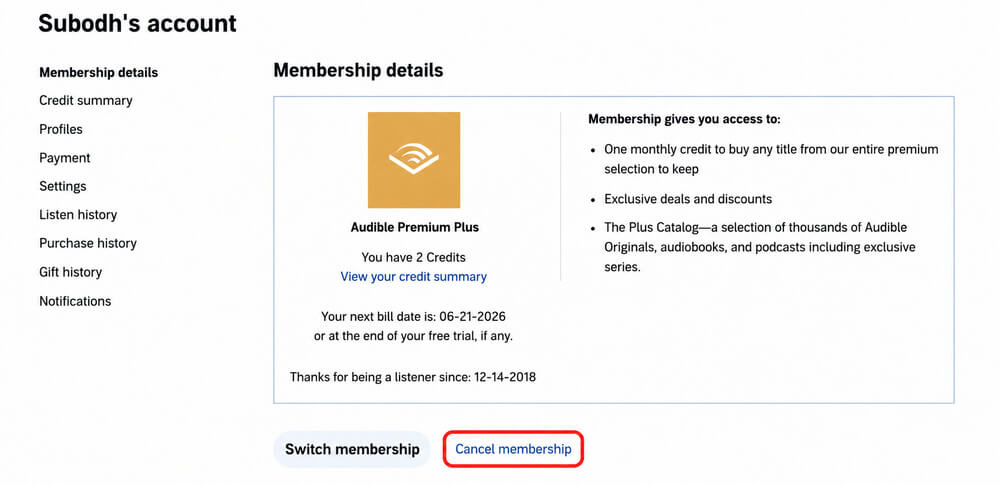
- Select Membership Details.
- Click Cancel Membership.
- Follow the final confirmation steps.
Cancel Audible Through Apple App Store
If your Audible membership is billed through Apple, you must cancel it from iPhone subscription settings.
- Open the Settings app on your iPhone or iPad.
- Tap on your Apple Profile/Name at the very top.
- Tap Subscriptions.
- Find and tap Audible in your list of active subscriptions.
- Tap Cancel Subscription
Cancel Audible Through Google Play
If your Audible membership is billed through Google Play:
- Open the Google Play Store.
- Tap your profile icon.
- Open Payments & Subscriptions.
- Tap Subscriptions.
- Select Audible.
- Tap Cancel Subscription.
What Stays and What Disappears After Cancellation?
Cancelling Audible does not remove everything from your account. Some benefits remain available after cancellation, while others end with the membership.
Purchased Audiobooks Stay
Any audiobook you purchased directly or obtained using Audible credits remains in your library even after cancellation.
You can still access, download, and listen to these books through the Audible app as usual.
Cancelling Audible stops the membership, not your ownership of purchased audiobooks.
Audible Standard Selections and Plus Catalog Titles Become Unavailable
Content that is available through an active membership works differently.
If you are an Audible Standard member, the audiobook selections included with your membership become unavailable once the membership ends.
Similarly, access to titles included in the Audible Plus Catalog is also removed after cancellation.
In many cases, these titles remain visible in your library but appear locked. If you restart an eligible Audible membership later, access is usually restored.
Unused Credits Are Usually Lost
Before cancelling, make sure to check your credit balance.
Unused Audible credits are lost when the membership ends, which means you will no longer be able to use them after cancellation.
If you have unused credits, it is usually best to spend them before cancelling your membership.
You can read our full guide here: How Audible Credits Work: Expiry, Refunds, Extra Credits & More
Should You Pause Audible Instead?
If you are taking a temporary break from audiobooks, pausing your membership may be a better option than cancelling altogether.
Depending on your membership and eligibility, Audible may allow you to pause your subscription for a limited period instead of ending it completely.
This can be useful if:
- You have a backlog of audiobooks to finish.
- You are listening less frequently at the moment.
- You plan to return to Audible in the near future.
During the cancellation process, Audible may offer a pause option or other retention offers. It is worth reviewing these before confirming cancellation.
Frequently Asked Questions
Can I restart Audible later?
Yes. Your Audible/Amazon account remains active even after cancellation, and you can restart membership anytime later.
Can I still use the Audible app after cancellation?
Yes. You can still use the app to access and listen to purchased audiobooks.
Can I cancel Audible during free trial?
Yes. You can cancel during the free trial period to avoid future billing.
Do credits disappear immediately after cancellation?
In most regions, yes. Unused credits are typically removed once the membership ends.
What happens to Audible Standard selections after cancellation?
Audiobook selections included with Audible Standard become unavailable when the membership ends. If you reactivate an eligible Audible membership later, access is usually restored.
Can I return audiobooks before cancelling?
Yes. Eligible audiobooks can usually still be returned before cancellation, depending on Audible’s return policy and account history.
Can I still download purchased audiobooks later?
Yes. Purchased audiobooks remain in your library and can be downloaded again later.
Is pausing better than cancelling?
If you only need a temporary break, pausing can sometimes be the better option because it may help preserve membership benefits temporarily.

4 thoughts on “How to Cancel Audible Membership in 2026: Step-by-Step Guide”
I never subscribe to audible and I am being charged 1596 at certain intervals do not know how this happened because I never subscribe to it I need to be compensated and definitely I need this canceled
Hey I would like to cancel any account/ subscription with Audible.
I didn’t even know i had membership, I feel so devastated, taking my R231 without any head-up.
I’m not sure I have a membership bc I tried the free week HOWEVER when I went through the subscription management there was no way to cancel!
You might have used Audible App or Audible’s mobile site, Marcia. As of now, the option to cancel your membership is available only through Audible’s desktop site. However, you can access the desktop site using your mobile too. The method is explained in the article above. I hope that helps. Good luck!